MEPCO Online Services Overview
More and more MEPCO users now use online services to check bills, make payments and raise complaints. If you are not used to online systems, it can feel confusing, but in many cases they can save you time and travel cost.
This guide gives a simple overview of the most common types of MEPCO online services that are usually available through official channels and authorised partners. It is general information only. Exact options, websites, apps and rules can change at any time, so always rely on the latest details from official MEPCO sources and your bank or payment provider.
1. Online MEPCO Bill Information
Most users start with online services to view their bill information.
A. Viewing your bill details
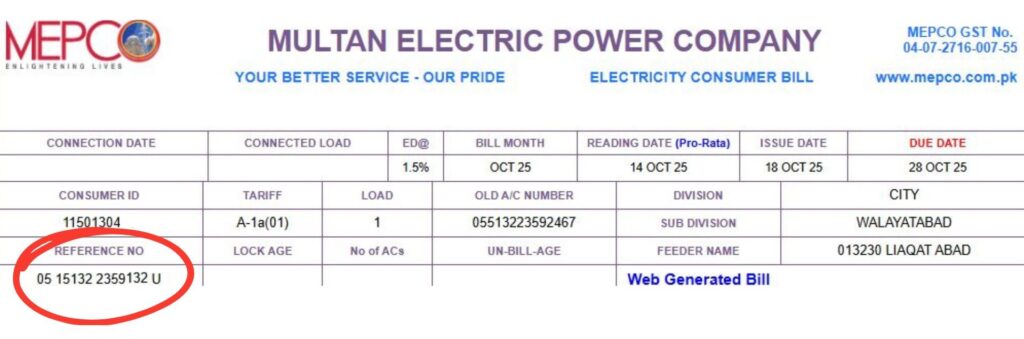
Through official MEPCO portals and authorised bill services, you can normally:
- Enter your Reference Number
- See your current bill details, such as billing month, units and total amount
- Sometimes see previous months’ basic information
These portals are useful when:
- You did not receive your paper bill on time
- You are outside your home city and want to know the latest bill amount
- You want to keep a record or screenshot of your bill details
Always make sure you are using a trusted and secure website. Avoid sharing your bill reference number on random or suspicious sites.
2. Online MEPCO Bill Payments
Actual bill payments are usually handled through:
- Commercial banks
- Mobile wallet and banking apps
- Other authorised collection partners
A. Paying through bank or wallet apps
Typical steps for many apps include:
- Login to your banking or mobile wallet app.
- Go to the Bill Payment / Utilities section.
- Select Electricity → MEPCO (or similar option).
- Enter your Reference Number exactly as printed on the bill.
- Confirm the bill details and amount shown by the app.
- Approve the payment using your PIN, biometrics or OTP, as required by your bank.
After payment, you should see a “successful / completed” status and receive:
- A transaction ID or reference number
- Sometimes an SMS or email from your bank
Keep a screenshot or copy of this confirmation for your records.
B. Safety tips for online payments
- Only use official bank and wallet apps downloaded from trusted app stores.
- Never share your PIN, OTP or full card details with anyone.
- Check that the bill details and reference number are correct before confirming payment.
- If a payment fails but money is deducted, contact your bank or wallet support and then MEPCO if needed.
3. Online Complaint and Contact Options
In addition to bill viewing and payments, MEPCO or related platforms may provide ways to raise complaints or get support.
A. Helpline and email
The most common official channels are still:
- MEPCO helpline numbers printed on your bill
- In some cases, official email addresses for written complaints
You can read our separate guides to understand which documents to prepare and how to explain your case clearly before you call or visit.
B. Online complaint forms
At times, websites or apps may include:
- Online complaint forms where you fill in your reference number, contact details and issue description
- Contact us pages for general feedback
If you use any online complaint form:
- Take a screenshot after submission showing date and time
- Save any reference number provided
- Keep checking your bill and, if needed, follow up through the helpline or local office
Always confirm that the form is on an official or clearly authorised platform, not just any unknown site.
4. Load Shedding and Fault Information
In some regions, official platforms or social media pages may share:
- Planned load shedding schedules
- Updates about faults or major breakdowns
- Emergency contact numbers
Because these messages can change quickly, it is better to:
- Follow official MEPCO or Government pages if they exist
- Confirm any long outage or unusual situation through helplines or local offices
Do not fully trust unverified screenshots or forward messages from random groups unless they match official announcements.
5. General Online Safety for MEPCO Users
When using any MEPCO online service or app, keep these general safety points in mind:
- Check the website address (URL) – it should look official and secure (https).
- Avoid clicking unknown links from SMS, WhatsApp or email that ask for bank or card details.
- Never share your password, PIN, OTP or full card number with anyone claiming to be from the bank or MEPCO.
- If someone calls you and asks for financial information to “fix your bill” or “solve arrears immediately”, end the call and contact your bank or MEPCO directly using the numbers printed on your bill.
Using official online services is supposed to make life easier, not riskier. A little caution can protect both your money and your account.
6. When You Still Need to Visit the MEPCO Office
Online options are helpful, but some tasks still require a physical visit, such as:
- Name or ownership change on the bill
- New connection applications
- Load change or meter change requests
- Complex billing disputes that need documents and signatures
In these cases, you can still use online tools to:
- Prepare your case (print bills, collect payment proofs)
- Understand the basic procedure before going to the office
- Check follow‑up status where such options exist
Online services and office visits work best together, not as full replacements for each other.
7. Summary and Disclaimer
MEPCO online services usually cover three main areas:
- Bill information – viewing your bill details and amounts
- Bill payments – paying through banks, mobile apps and authorised partners
- Complaints and support – using helplines, emails and sometimes online forms to raise issues
This guide is only a general overview. The actual list of available services, websites, apps and processes can change at any time and may differ by area.
For the latest and most accurate information, always:
- Check the official MEPCO website
- Read details printed on your latest bill
- Contact the MEPCO helpline or local office